Thunderstore - Mods, Downloads and Mod Manager
If you have ever searched for mods for Lethal Company, Valheim, Risk of Rain 2, R.E.P.O. or another moddable PC game, you have probably come across Thunderstore. It may look like a simple place to download mods at first, but the platform actually combines mod discovery, dependencies, plugins, modpacks, profiles and dedicated mod management tools into one ecosystem.
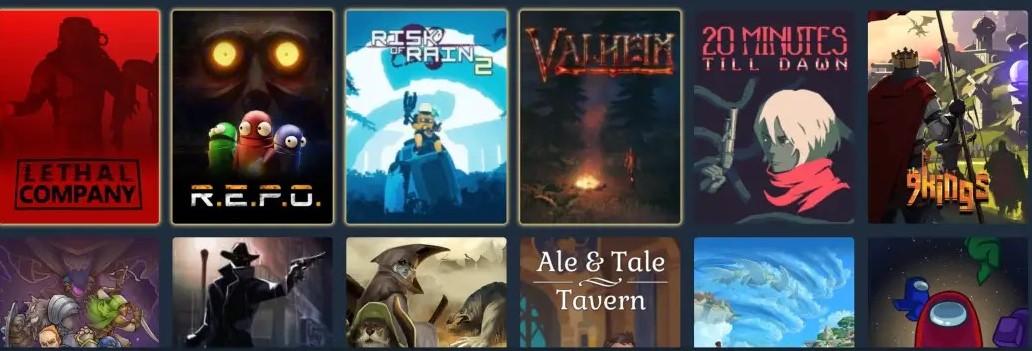
In 2026, Thunderstore has grown into a large modding platform covering hundreds of game communities and more than 100,000 community packages. That scale is useful, but it can also be confusing for newcomers. Should you download a ZIP file manually? Do you need the Thunderstore app? What is the difference between Thunderstore Mod Manager and r2modman? And what happens when a game update suddenly breaks half your mods?
This guide explains how Thunderstore works, how to install and update mods, how profiles help with multiplayer, what the Mod Manager actually does, and when manual installation may still make sense.
What Is Thunderstore?
Thunderstore is a community-driven mod database and distribution platform where creators publish mods, plugins, libraries, tools and modpacks for supported PC games. Players can browse packages directly through the Thunderstore website or manage many of them through compatible desktop applications.
The easiest way to understand the system is to separate Thunderstore itself from the tools that interact with it. Thunderstore is the package repository. Thunderstore Mod Manager and r2modman are applications that help you install, organize and update those packages.
Think of Thunderstore as a huge warehouse full of game modifications. A mod manager is the system that helps you find the right boxes, keep track of what is inside them and make sure one package does not disappear when another package depends on it.
What Is Thunderstore Used For?
Most players use Thunderstore to find modifications for their favorite games and avoid managing every file by hand. The platform is especially useful when a game has a large modding community and many packages depend on shared libraries or frameworks.
Typical uses include finding gameplay mods, downloading plugins, installing dependencies, building separate mod profiles, updating packages and sharing a complete configuration with friends. Players can also use modpacks when they want a pre-arranged collection rather than selecting every modification individually.
Illustrative expert perspective — Ethan Mercer, PC modding support consultant: “The biggest jump for a new mod user happens when they stop thinking of every mod as a single file. Modern modding is usually a small ecosystem of packages, libraries and versions working together.”
How Do Thunderstore Mods Work?
Each Thunderstore game has its own community area. A game with an active modding scene may contain hundreds or thousands of packages covering gameplay changes, interface improvements, new items, maps, characters, utilities, server tools and complete modpacks.
A Thunderstore mod page normally includes the package name, creator, version, description, download information, dependency details and changelog. These details become particularly important when several mods interact with one another.
Many games also require a mod loader. Names such as BepInEx or MelonLoader frequently appear in Thunderstore communities because these frameworks provide the environment needed for compatible plugins to run.
This means the complete process may look something like:
Game → Mod loader → Thunderstore package → Mod manager → Game profile
You do not need to memorize that chain when everything works normally. However, understanding it can save a lot of time when a game suddenly refuses to launch after an update.
What Is Thunderstore Mod Manager?
Thunderstore Mod Manager is a Windows application designed to make Thunderstore mods easier to install and maintain. Instead of manually copying files into game folders, players can search for packages, install dependencies, enable or disable mods and organize different setups into profiles.
The manager is distributed through Overwolf and offers features such as mod installation, update detection, configuration management, profile creation and profile sharing.
Why Are Profiles So Useful?
Profiles are one of the strongest reasons to use a mod manager.
Imagine playing Lethal Company with two different groups. One group wants only a few quality-of-life improvements. Another wants custom monsters, additional items, new moons and a heavily modified multiplayer experience.
Instead of repeatedly deleting and reinstalling files, you can create separate profiles such as Vanilla Plus and Weekend Chaos. Each profile keeps its own selection of mods and settings.
This also helps when testing updates. Rather than risking your stable configuration, you can duplicate a working profile and experiment with the copy.
How to Install Thunderstore Mod Manager
Installing the manager is straightforward for most Windows users. Start by getting Thunderstore Mod Manager from the Thunderstore ecosystem or its Overwolf distribution page, then complete the normal desktop installation process.
After opening the application, choose the game you want to modify and create a profile. From there, browse the available mods, choose the package you want and install it along with any required dependencies.
Once your setup is ready, launch the modded game through the manager. The exact experience varies slightly between games because different communities use different mod loaders and configuration systems.
A good habit is to keep the mod manager's data directory separate from the actual Steam game folder. Mixing manually copied files with manager-controlled files can make troubleshooting unnecessarily difficult.
How to Download Mods From Thunderstore
There are two main ways to perform a Thunderstore mod download: install the package through a compatible mod manager or download the package manually.
Using Thunderstore Mod Manager
For most users, the manager is the easier approach. Choose a game, select a profile, search for the mod and install it. If that package requires other libraries or frameworks, the manager can usually identify the dependency chain and install the required components as well.
Installed packages appear inside the selected profile. Depending on the package, you may then be able to enable it, disable it, edit its configuration, uninstall it or update it without touching the game's main directory.
Can You Install Thunderstore Mods Manually?
Yes. Many Thunderstore packages can be downloaded manually. Manual installation can be useful for advanced users who want complete control over their files or when a specific mod requires a non-standard setup.
The trade-off is that you become responsible for file locations, dependencies, version compatibility and future updates. Some mods may need files placed inside plugin folders, configuration directories or loader-specific locations.
For one small modification, that may be perfectly manageable. For a setup containing 40 interconnected plugins, manual management can quickly become a puzzle.
Thunderstore vs Manual Mod Installation
| Feature | Thunderstore Mod Manager | Manual Installation |
|---|---|---|
| Ease of use | Beginner-friendly | Requires more experience |
| Dependencies | Usually easier to manage | Handled manually |
| Profiles | Built in | Requires your own organization |
| Mod updates | Convenient update detection | Usually checked individually |
| Enable or disable mods | Quick profile controls | May require moving files |
| File control | Mostly automated | Maximum direct control |
| Best suited for | Most players and larger mod setups | Advanced users and special installations |
Neither method is automatically better for every situation. Manual installation gives experienced users a high level of control, while a manager reduces repetitive work and makes larger collections easier to maintain.
r2modman vs Thunderstore Mod Manager
The comparison between r2modman vs Thunderstore Mod Manager confuses many newcomers because both applications work with the Thunderstore ecosystem and provide similar features.
Thunderstore Mod Manager is the Thunderstore-branded option distributed through Overwolf. r2modman is a separate community-developed manager that also connects to Thunderstore packages and supports profile-based mod management.
Both can handle common tasks such as installing mods, detecting updates, managing configurations and organizing separate profiles. r2modman is especially familiar among users who prefer a lightweight standalone workflow or need Linux support.
| Feature | Thunderstore Mod Manager | r2modman |
|---|---|---|
| Thunderstore integration | Yes | Yes |
| Profiles | Yes | Yes |
| Mod updates | Yes | Yes |
| Configuration management | Yes | Yes |
| Windows support | Yes | Yes |
| Linux options | Limited | Available |
| Distribution model | Through Overwolf | Standalone community project |
Illustrative expert perspective — Olivia Grant, game tools administrator: “For most players, the important question is not which manager has the better logo. It is whether your profiles, dependencies and versions remain organized when the game updates.”
What Games Does Thunderstore Support?
The Thunderstore game list has expanded considerably over time. By 2026, the platform covers more than 300 game communities, ranging from major modding scenes to small experimental projects.
Well-known examples include Lethal Company, Valheim, Risk of Rain 2, R.E.P.O., PEAK, H3VR, Dyson Sphere Program, BONEWORKS, BONELAB, Core Keeper, Cult of the Lamb, GTFO, Outward, ROUNDS, Subnautica, Timberborn, V Rising and ULTRAKILL.
The list continues to change as new games gain modding communities. Because of that, checking the current Thunderstore game directory is more useful than relying on an old static list.
Why Is Lethal Company Thunderstore So Popular?
Lethal Company Thunderstore became particularly popular because the game works extremely well with community modifications. Players use mods to add monsters, improve interfaces, introduce new maps, change gameplay systems, expand items and adjust multiplayer features.
The real challenge appears when everyone in a multiplayer lobby needs compatible versions. One player may have an older dependency while another has updated a plugin that changes networking behavior.
This is where profiles become valuable. Instead of asking five friends to locate and download dozens of individual packages, the host can share a prepared configuration.
How Do Thunderstore Multiplayer Mods Work?
Thunderstore multiplayer mods do not all behave the same way. Some are client-side and affect only the person who installs them. Others must be installed by the host, server or every player joining the session.
Version matching can also matter. Two players may technically have the same mod but use different releases, creating errors or preventing them from joining each other.
A shared profile helps reduce these differences because everyone can begin from a similar mod list and configuration. It does not automatically fix incompatible packages, but it makes diagnosing mismatches much easier.
Community-style experience — Marcus T.: “Once our group started sharing profiles, setup stopped taking half the evening. The biggest improvement was simply knowing everyone was starting from almost the same mod list.”
How to Update Thunderstore Mods
Updating mods through a manager is usually easier than checking every package manually. Outdated mods can typically be identified within your installed profile, allowing you to update individual packages or multiple available updates.
However, updating everything immediately is not always the best strategy.
Imagine your 30-mod profile works perfectly on Friday. On Saturday, you update 12 packages and the game crashes during startup. You now have 12 possible suspects.
A safer workflow is to duplicate your working profile before a large update. Apply a few changes, test the game, then continue if everything remains stable.
It is also possible for a newly published Thunderstore update to appear on the website before it becomes visible inside a manager because package data can be cached temporarily.
What Are Thunderstore Plugins and Dependencies?
A Thunderstore plugin is generally a package that adds or changes functionality inside a game or its modding framework. A dependency is another package that the plugin needs in order to work.
For example, a gameplay mod might rely on BepInEx plus a separate configuration library. Installing only the main mod may result in nothing happening when you launch the game.
This is one reason mod managers are useful. Instead of manually reading a dependency tree and collecting each package yourself, the software can often install the required components automatically.
What Is a Thunderstore Modpack?
A modpack is a prepared collection of modifications intended to work together. It can include dependencies and configuration choices that create a specific gameplay experience.
A profile serves a similar purpose but is often more convenient for quickly sharing your current setup with friends. A published modpack is better suited to a collection that a creator wants to maintain and distribute to a larger audience.
Is Thunderstore Free?
Thunderstore can be used without paying to browse community packages and download publicly available mods. Thunderstore Mod Manager is also available as a free application.
The manager may display advertising and can include optional paid features through its surrounding platform, but players do not need to purchase individual community mods simply to use the standard Thunderstore download system.
The games themselves are separate products, of course, so you still need access to the game you want to modify.
Is Thunderstore Safe to Download?
No community mod platform can promise that every third-party package will always behave perfectly. Thunderstore does maintain moderation rules and prohibits packages containing harmful software, but mods remain software created by independent developers.
The best approach is to treat mods the same way you would treat any other downloadable program. Pay attention to the package creator, recent activity, dependencies, changelog and community feedback.
Avoid downloading repackaged mod managers from random websites simply because they appear near the top of a search result. When using tools such as r2modman, obtain them from their established distribution locations rather than unfamiliar copies.
Keeping important working profiles backed up is also a smart habit. A backup will not prevent a bad update, but it can make recovery dramatically easier.
Does Thunderstore Work With Steam Games?
Yes. Many popular Thunderstore games are installed through Steam, and compatible mod managers are designed to work with those game installations.
For supported titles, the manager detects or allows you to select the game location and then launches a modded environment using the chosen profile.
Depending on the game and mod loader, you may still be able to launch a normal unmodded version separately through Steam. This makes profiles especially useful when you want one clean setup and another heavily modified setup on the same computer.
Does Thunderstore Require an Account?
Ordinary users can browse many public Thunderstore packages and use common modding features without making account management central to the experience.
Accounts become more relevant for creators who publish packages, maintain projects or work with development teams.
Players sharing a mod profile with friends can often use profile codes or exported files rather than asking everyone to manually reconstruct the entire setup.
How to Use Thunderstore Without Creating a Mess
The biggest mistake newcomers make is installing dozens of interesting mods at once.
It feels efficient until the game stops launching.
A better approach is to create a fresh profile and install the basic mod loader first. Launch the game once to confirm that the environment works. Then add your most important mods in small groups and test again.
If something breaks, you now have only a few recent changes to investigate instead of fifty.
It is also worth keeping one profile labeled something like Stable. Once that configuration works reliably, avoid experimenting directly inside it. Duplicate it before making major changes.
What If Thunderstore Mods Are Not Working?
When a modded game fails to launch, reinstalling the entire game should not be your first reaction. Problems frequently come from incompatible package versions, incorrect paths, old manually installed files, missing dependencies or a mod loader that no longer matches the current game version.
Start with a clean test profile. Install only the required loader and launch the game. If it works, add a dependency or important mod and test again. Continue gradually until the problem returns.
This process may feel slower than randomly disabling mods, but it is much more effective at identifying the actual cause.
Why Did My Mods Stop Working After a Game Update?
Game updates can change code, file structures or internal systems that mods depend on. A package that worked yesterday may need an update from its developer before it functions correctly with the latest game version.
When a major game patch arrives, checking mod updates before rebuilding your entire configuration can save a lot of frustration.
Thunderstore in 2026: Why Profiles Matter More Than Ever
Thunderstore is interesting because PC modding has gradually changed from copying random files into a directory to managing something closer to a small software environment.
Your setup may contain a mod loader, libraries, plugins, configuration files, dependencies and multiple versions of packages that need to cooperate.
Profiles make that complexity easier to control.
You can maintain one profile for normal gameplay, another for multiplayer, another for testing new mods and another ridiculous setup where almost nothing resembles the original game anymore.
That separation makes experimenting less stressful because one bad update does not necessarily destroy every configuration you use.
Thunderstore vs Other Ways to Mod PC Games
Thunderstore is not the only approach to PC modding. Some games have built-in workshop systems, others rely on dedicated community websites, while certain titles use game-specific launchers.
Thunderstore's advantage is its package-oriented ecosystem. Mods, versions, dependencies and profiles can all be organized around a consistent workflow across many different games.
That does not mean every game is best modded through Thunderstore. The ideal tool still depends on the community surrounding the specific title.
For games with strong Thunderstore support, however, the combination of searchable packages and profile-based management makes experimentation much easier than maintaining a large folder of manually downloaded ZIP files.
Conclusion
Thunderstore has evolved into much more than a website for downloading game mods. It combines a large package database with plugins, dependencies, modpacks, profile sharing and tools such as Thunderstore Mod Manager and r2modman.
Manual installation can still make sense for experienced users or unusual setups, but mod managers become increasingly valuable as your collection grows. Profiles make it easier to separate multiplayer configurations, test updates and recover when a package causes trouble.
If you are new to Thunderstore, start small. Create a fresh profile, install only a few mods at a time and keep a stable configuration before experimenting. That simple habit can turn modding from a troubleshooting marathon into what it is supposed to be: a fun way to make your favorite games feel new again.
Frequently Asked Questions About Thunderstore
What is Thunderstore?
Thunderstore is a community mod platform that hosts mods, plugins, libraries, tools and modpacks for hundreds of PC games. Packages can be downloaded manually or managed through compatible applications such as Thunderstore Mod Manager and r2modman.
What is Thunderstore Mod Manager?
Thunderstore Mod Manager is a Windows application that helps players install, update, configure, enable and disable Thunderstore mods. It also supports separate profiles, making it easier to maintain different mod setups for the same game.
How do I download mods from Thunderstore?
Select your game, choose a package and either install it through a compatible mod manager or download the package manually. Using a manager is usually easier when a mod requires several dependencies or frequent updates.
Can I install Thunderstore mods manually?
Yes. Many packages support manual installation, but you must handle the correct file locations, dependencies and updates yourself. Manual installation is generally better suited to experienced users or mods with unusual installation requirements.
Does Thunderstore work with Steam games?
Yes. Many Thunderstore-supported games are Steam titles. Compatible mod managers can work with Steam game installations and launch a selected mod profile while keeping different configurations organized separately.
Can I use Thunderstore without an account?
Most players can browse public packages and perform ordinary mod downloads without making an account a major part of the process. Accounts are more relevant to creators who publish and maintain packages.
What is the difference between r2modman and Thunderstore Mod Manager?
Both applications work with Thunderstore packages and support profiles, updates and configuration management. Thunderstore Mod Manager is distributed through Overwolf, while r2modman is an independent community-developed manager with standalone options and Linux support.